Discussed. Documented. Done.
MeetingPuck transcribes, summarizes and assigns tasks to the right people – entirely on your iPhone. No cloud, no account, no data on our side.
Download on the App StoreRequires an iPhone with Apple Intelligence (iPhone 15 Pro or later) and iOS 26.
Put your iPhone on the table, confirm everyone has been informed, start recording – even with the screen locked.
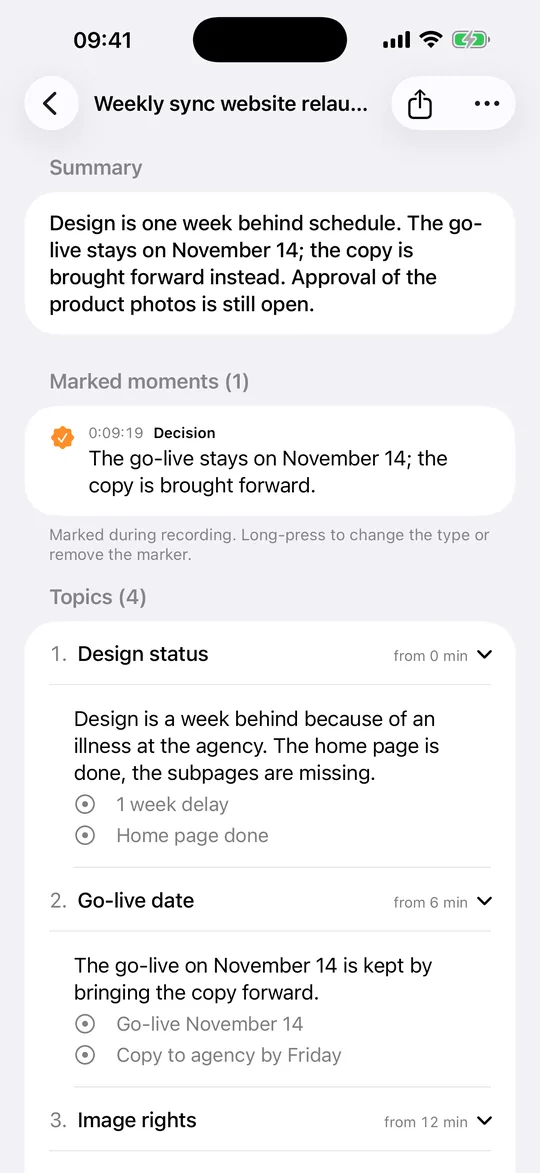
Right afterwards: summary, decisions, open points and tasks with owner and due date.
Add tasks to Reminders and Calendar, share the minutes as PDF.
The minutes are ready when the meeting ends. All you do is review them.
Who does what by when – with owner and due date, straight into your Reminders.
Recording and analysis run on the device – even without internet. No account, no cloud.
Commissioning in a factory hall, a customer meeting abroad, a site with no reception: MeetingPuck records and analyzes – no internet needed. Your minutes are ready before you’re back online.
Needed once beforehand: set up the meeting language on your iPhone while you have internet.
Example: service, sales & on the road →The meeting type decides what MeetingPuck pays attention to – and the frame of the analysis. A private conversation is not treated like a business meeting.
Weekly sync, customer meeting, kickoff, steering committee: decisions, tasks with due dates, follow-up email.
Board meeting, members’ or owners’ meeting: resolutions with voting results, structured by agenda.
Client meeting: facts, advice given, requested documents and deadlines – confidential, no cloud.
Site meeting and on-site customer visit: defects with location, change orders, trades, next dates.
Lecture and study group: key points, terms, examples, exam hints and assignments.
Family meeting, doctor’s visit with relatives, parents’ evening: captured in everyday language, no business jargon.

I’ve been managing projects since 2009 and wrote minutes after almost every meeting. MeetingPuck is the tool I wished I had.
The full story →| Plan | Includes | Price |
|---|---|---|
| Free | 3 meetings per month, up to 30 minutes each | €0 |
| Pro monthly | Everything unlimited, incl. reports, questions, backup, import | €6.99 / month |
| Pro yearly | same as monthly | €59.99 / year |
| Pro Lifetime | pay once, use forever | €149.99 |
Subscriptions include a 14-day free trial. Payment and cancellation via your Apple ID. Prices in your country’s App Store may differ.
 MeetingPuck